;%20}%20.cls-2,%20.cls-3%20{%20fill:%20%23fff;%20}%20.cls-3%20{%20stroke-width:%200px;%20}%20%3c/style%3e%3cclipPath%20id='clippath'%3e%3cpath%20class='cls-3'%20d='M27.79,132.08H0V1.94h94.23v24.67H27.79v32.25h55.35v24.67H27.79v48.56ZM128.8,132.08h-29.52L148.03,1.94h35.75l48.75,130.15h-30.5l-10.29-28.94h-52.46l-10.48,28.94ZM157.73,51.67l-10.1,27.98h35.56l-9.92-27.98-7.77-27.58-7.77,27.58ZM271.76,132.08h-27.79V1.94h27.02l46.23,67.98,11.83,20.4-1.75-30.69V1.94h27.79v130.15h-26.42l-47.4-68.56-11.67-19.23,2.15,32.23v55.56ZM426.18,133.65c-16.18,0-29.2-5.79-39.04-17.38-9.85-11.59-14.77-28.08-14.77-49.46,0-19.8,5.79-35.89,17.38-48.25,11.59-12.38,27.63-18.56,48.1-18.56,13.72,0,25.59,3.02,35.63,9.04,10.04,6.02,17.32,14.46,21.85,25.33l-23.5,17.88c-1.81-7.64-5.66-13.82-11.56-18.54-5.89-4.73-13.36-7.1-22.42-7.1-11.67,0-20.52,3.6-26.54,10.79-6.02,7.18-9.02,16.99-9.02,29.42s3.04,22.64,9.13,29.83c6.09,7.18,14.65,10.77,25.65,10.77,16.05,0,26.94-7.57,32.65-22.73h-35.75v-22.33h62.35v69.73h-18.46l-6.6-47.4c-.64,15.41-4.89,27.42-12.73,36.04-7.83,8.61-18.61,12.92-32.33,12.92ZM535.93,132.08h-29.52L555.16,1.94h35.75l48.75,130.15h-30.5l-10.29-28.94h-52.46l-10.48,28.94ZM564.87,51.67l-10.1,27.98h35.56l-9.92-27.98-7.77-27.58-7.77,27.58ZM709.98,132.08h-27.79V26.6h-38.83V1.94h105.46v24.67h-38.83v105.48ZM857.6,132.08h-95.58V1.94h95.58v24.67h-67.79v27.4h56.71v24.67h-56.71v28.75h67.79v24.67ZM885.56,132.08h0c-8.15,0-14.76-6.61-14.76-14.76v-.58c0-8.15,6.61-14.76,14.76-14.76h0c8.15,0,14.76,6.61,14.76,14.76v.58c0,8.15-6.61,14.76-14.76,14.76Z'/%3e%3c/clipPath%3e%3c/defs%3e%3cg%20id='Ebene_1-2'%20data-name='Ebene%201'%3e%3cg%3e%3cpath%20class='cls-2'%20d='M27.79,132.08H0V1.94h94.23v24.67H27.79v32.25h55.35v24.67H27.79v48.56ZM128.8,132.08h-29.52L148.03,1.94h35.75l48.75,130.15h-30.5l-10.29-28.94h-52.46l-10.48,28.94ZM157.73,51.67l-10.1,27.98h35.56l-9.92-27.98-7.77-27.58-7.77,27.58ZM271.76,132.08h-27.79V1.94h27.02l46.23,67.98,11.83,20.4-1.75-30.69V1.94h27.79v130.15h-26.42l-47.4-68.56-11.67-19.23,2.15,32.23v55.56ZM426.18,133.65c-16.18,0-29.2-5.79-39.04-17.38-9.85-11.59-14.77-28.08-14.77-49.46,0-19.8,5.79-35.89,17.38-48.25,11.59-12.38,27.63-18.56,48.1-18.56,13.72,0,25.59,3.02,35.63,9.04,10.04,6.02,17.32,14.46,21.85,25.33l-23.5,17.88c-1.81-7.64-5.66-13.82-11.56-18.54-5.89-4.73-13.36-7.1-22.42-7.1-11.67,0-20.52,3.6-26.54,10.79-6.02,7.18-9.02,16.99-9.02,29.42s3.04,22.64,9.13,29.83c6.09,7.18,14.65,10.77,25.65,10.77,16.05,0,26.94-7.57,32.65-22.73h-35.75v-22.33h62.35v69.73h-18.46l-6.6-47.4c-.64,15.41-4.89,27.42-12.73,36.04-7.83,8.61-18.61,12.92-32.33,12.92ZM535.93,132.08h-29.52L555.16,1.94h35.75l48.75,130.15h-30.5l-10.29-28.94h-52.46l-10.48,28.94ZM564.87,51.67l-10.1,27.98h35.56l-9.92-27.98-7.77-27.58-7.77,27.58ZM709.98,132.08h-27.79V26.6h-38.83V1.94h105.46v24.67h-38.83v105.48ZM857.6,132.08h-95.58V1.94h95.58v24.67h-67.79v27.4h56.71v24.67h-56.71v28.75h67.79v24.67ZM885.56,132.08h0c-8.15,0-14.76-6.61-14.76-14.76v-.58c0-8.15,6.61-14.76,14.76-14.76h0c8.15,0,14.76,6.61,14.76,14.76v.58c0,8.15-6.61,14.76-14.76,14.76Z'/%3e%3cg%20class='cls-1'%3e%3crect%20class='cls-3'%20x='-27.9'%20y='-32.28'%20width='934.94'%20height='189.98'/%3e%3c/g%3e%3c/g%3e%3c/g%3e%3c/svg%3e)
This is one of the most important Fangate updates so far. With Fangate API Keys, your Fangate account becomes programmable. Trusted external tools, AI assistants, automations, dashboards, and custom apps can now connect to selected parts of your Fangate account — without ever sharing your login credentials.
Before this update, creators had to manually create links, copy URLs, check analytics, and repeat the same sales operations again and again. With API Keys, Fangate can now become part of an automated creator operating system.
Fangate is no longer only something you use manually. With API Keys, Fangate can become part of your automated sales stack.
What Are Fangate API Keys?
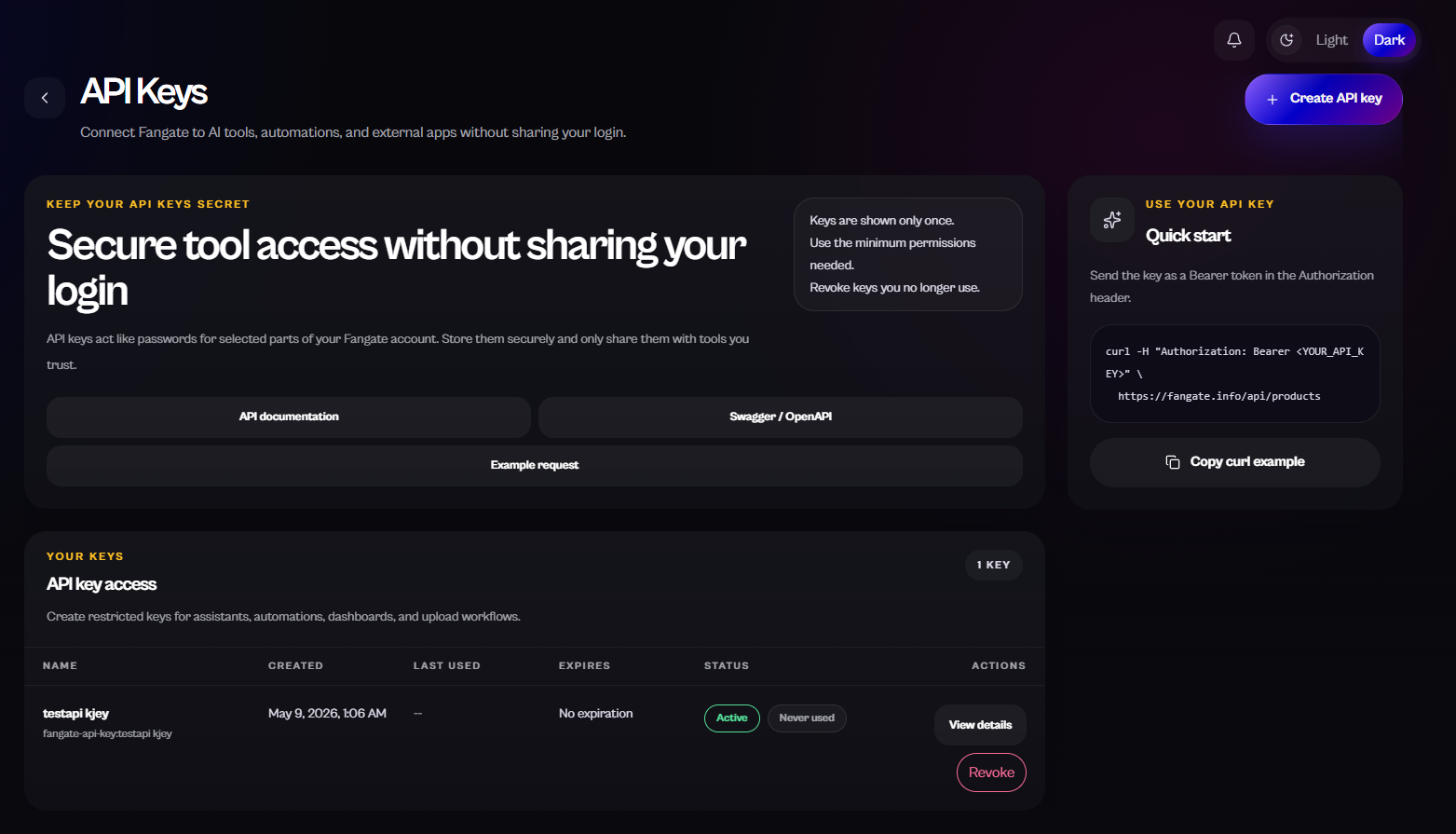
An API key is a secure access credential that lets external software communicate with selected parts of your Fangate account. It allows trusted tools to perform approved actions without requiring your login. Access depends entirely on the permissions you select when creating the key.
Think of an API key as a limited-access pass for software. Instead of giving a tool your full account login, you give it a controlled key with specific permissions — and you can revoke it at any time.
Why This Update Matters for Creators
Modern creators do not just need payment links. They need systems. Content drops, sales links, analytics, pricing experiments, buyer access, campaigns, DM workflows, community posts, performance tracking — all of it benefits from automation.
Manual work limits growth. The creators who scale are not only creating content. They are building systems around their content. Fangate API Keys are the foundation for that.
From Manual Dashboard to Programmable Creator Business
Before: log in manually, upload manually, create links manually, copy URLs manually, check analytics manually, repeat the same workflow for every drop.
After: AI tools can help generate links, dashboards can pull analytics, automations can create links from new content, assistants can prepare campaign URLs, and no-code tools can connect entire workflows. Agencies can operate more efficiently across multiple creators.
How AI Tools Can Use Fangate API Keys
A normal chatbot can suggest what to do. An API-connected AI agent can help do the work. With Fangate API Keys, you can instruct tools like:
- "Create a new Fangate sales link for this content drop."
- "Check which paid media link performed best this week."
- "Generate three price variants for a new bundle."
- "Pull my Fangate analytics into a dashboard."
- "Find underperforming links and suggest changes."
- "Create a custom-priced link for a VIP buyer."
- "Prepare a weekly sales report."
Fangate API Keys can be used with categories of tools such as AI assistants, agentic AI tools, workflow automation platforms, no-code builders, internal dashboards, custom scripts, MCP-style tool connections, and creator agency software. Custom workflows can be built around assistants like ChatGPT-style or Claude-style agents, Zapier-style automations, or Make/n8n-style flows.
Creating Your First API Key
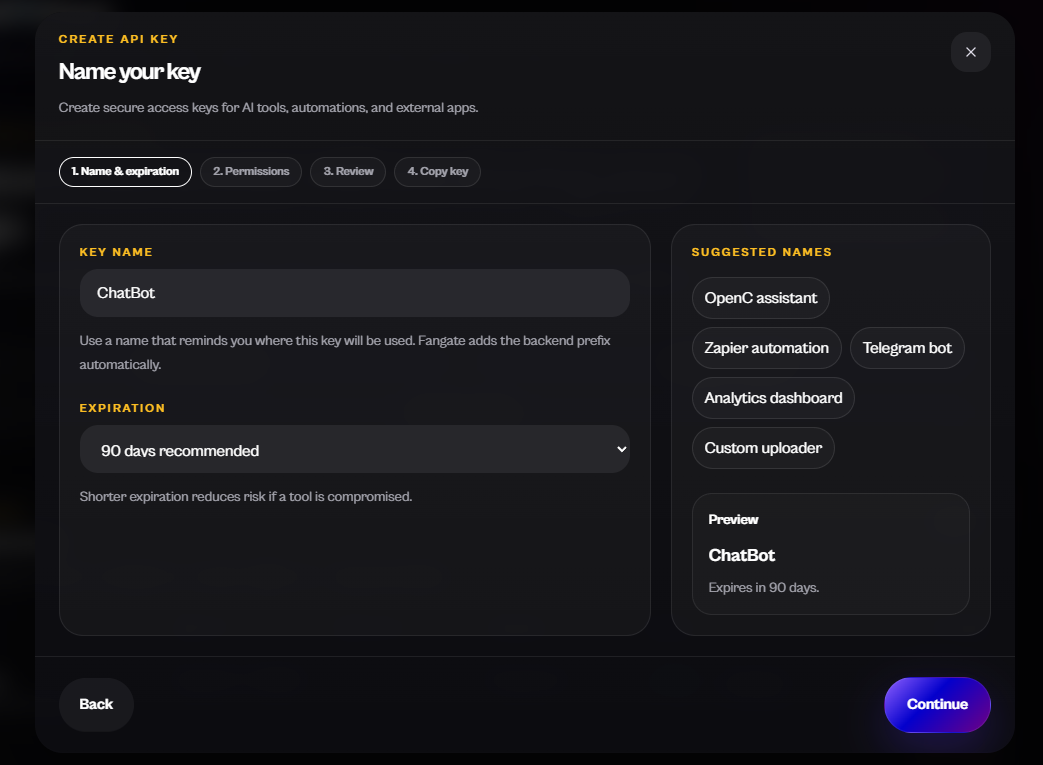
The flow is designed to be simple but secure. Name your key after the tool or workflow it will power, choose an expiration (90 days is recommended), then move on to permissions.
What Creators Can Automate with Fangate API Keys
1. Automated Sales Link Creation
When you upload a new premium photo set or media file, an automation can prepare a Fangate link, set pricing, and return the shareable URL — ready to post.
2. AI-Powered Content Drop Workflows
Build a repeatable workflow: upload content → generate Fangate link → generate captions → prepare Telegram, Reddit, and X posts → save link to a campaign tracker → check analytics later.
3. Analytics Dashboards
External dashboards can use API access to display your link performance, campaigns, sales activity, and conversion patterns — depending on the analytics endpoints available.
4. Smart Pricing Experiments
Generate multiple price points for the same content — teaser, standard unlock, premium bundle, VIP custom link, limited-time drop — then let analytics show which performs best.
5. Creator Agency Operations
Agencies managing multiple creators can build dashboards, standardize link creation, monitor campaign performance, and create repeatable operating procedures.
6. Custom Buyer Offers
Use automation to create special links for specific buyer situations — a custom bundle, private drop, or limited offer.
7. Weekly AI Sales Reports
An AI assistant can pull available analytics and summarize: best-performing links, highest-converting drops, revenue trends, underperforming campaigns, and suggested next actions.
8. No-Code Automation
Connect Fangate to workflow tools, scripts, or internal systems without manually operating every step.
9. Automated Link Libraries
Build internal libraries of your Fangate links, organized by content type, campaign, platform, price, or performance.
10. AI Sales Assistant for Creators
Imagine telling your assistant: "Create a €15 link for this new media file, write three captions, save the link to my campaign tracker, and remind me to check analytics tomorrow."
Understanding API Key Permissions
Permissions are the heart of API Key security. Fangate ships with clear presets — and you can always go fully custom.
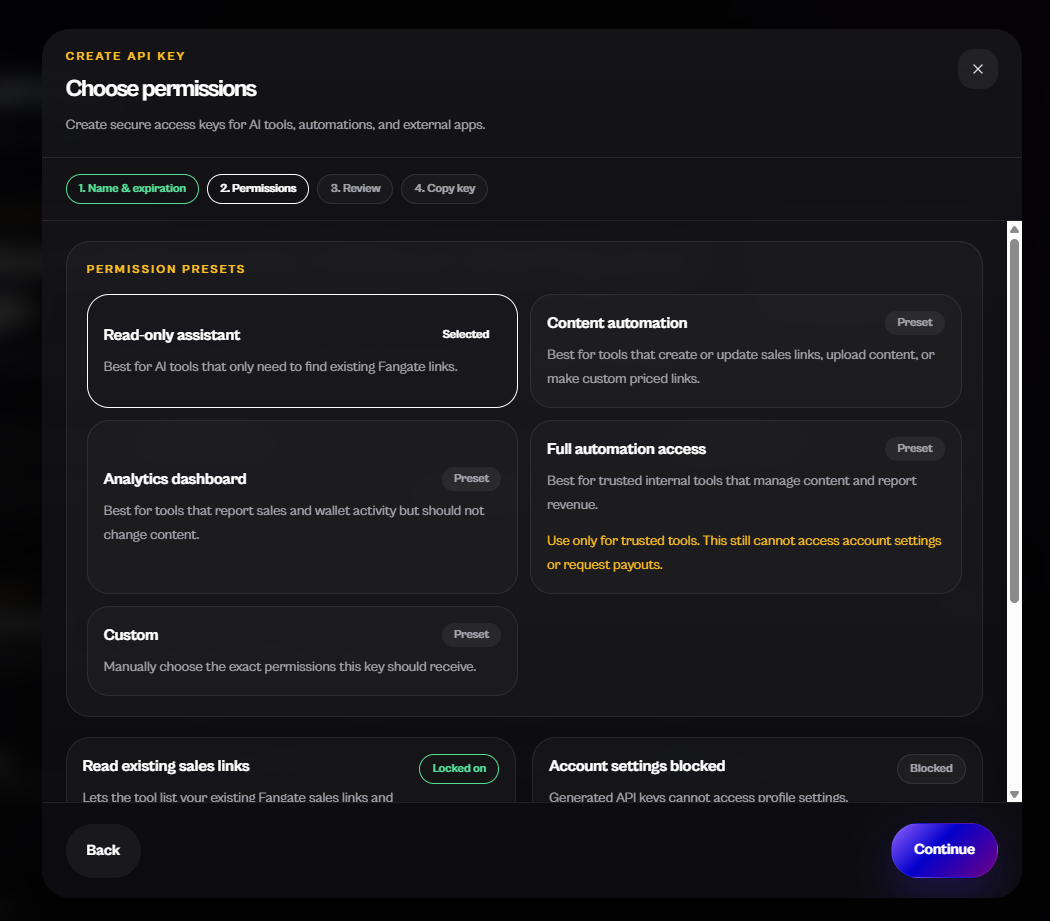
- Read-only assistant — best for AI tools that only need to find existing Fangate links or read available data. Ideal for safe assistant workflows.
- Content automation — best for tools that create or update sales links, upload content, or make custom-priced links.
- Analytics dashboard — best for tools that report sales and wallet activity but should not change content.
- Full automation access — best only for trusted internal tools that need broader access. Use only with tools you fully trust.
- Custom — manually choose the exact permissions a key should receive.
The safest approach: start with the minimum permissions needed and expand only when necessary.
API Key Security: How to Use This Feature Safely
API keys act like passwords for selected account functions. Treat them with the same care:
- Keys are shown only once — copy and store them immediately.
- Never paste keys into public chats, browser code, public repositories, screenshots, or shared documents.
- Use the minimum permissions needed for each tool.
- Set expirations — 90 days is recommended.
- Revoke keys you no longer use.
- Create separate keys for separate tools, so you can rotate them independently.
- If a key is compromised, revoke it immediately.
- When building software, store keys in environment variables or a proper secrets manager — never in client-side code.
Why OpenAPI and Swagger Matter
Fangate provides API documentation and Swagger / OpenAPI access. OpenAPI is like a map of the Fangate API — it shows tools and developers which actions are available and how to call them. That makes integrations, dashboards, and AI tool wiring dramatically faster, even for technical creators and agencies building custom workflows.
Why This Is Big for AI Agents
A normal chatbot gives advice, writes captions, suggests strategy, and summarizes ideas. An API-connected AI agent can help create links, retrieve analytics, prepare dashboards, and execute approved actions through the Fangate API.
The future of creator monetization is not only AI-generated content. It is AI-operated sales infrastructure.
Practical Automation Examples
| Use case | What the AI/tool does | Best permission | Creator benefit |
|---|---|---|---|
| Weekly sales summary | Pull analytics | Analytics dashboard | Better decisions |
| New content drop | Create link & campaign copy | Content automation | Faster launches |
| Existing link lookup | Find & reuse links | Read-only assistant | Less manual searching |
| Custom buyer offer | Create custom-priced link | Content automation | Faster DM sales |
| Agency dashboard | Display performance | Analytics dashboard | Centralized management |
| Full workflow automation | Manage content & reporting | Full automation access | Advanced internal systems |
| Developer integration | Build custom creator tool | Custom | Exact control |
Monetization Playbooks: How Smart Creators Use This
Playbook 1: The Content Drop Machine
Upload content → AI creates the Fangate link → AI writes launch copy → distribute across Telegram, Reddit, X, DMs → review analytics → repeat the formats that win.
Playbook 2: The Tiered Offer System
Create multiple offers for the same content — low-price teaser, standard unlock, bundle, VIP exclusive, custom high-ticket link — to test buyer intent and maximize revenue.
Playbook 3: The AI Analytics Operator
Use API-connected analytics to identify what sells: which links got attention, which content types performed best, which price points worked, what to create next.
Playbook 4: The Agency Dashboard
Build a single dashboard that shows link activity, sales performance, content drops, and workflow status across every creator on the roster.
Playbook 5: The DM-to-Link Workflow
A buyer sends a request. Instead of manually creating a link, an AI assistant prepares a custom-priced Fangate link and a draft response.
Playbook 6: The Autopilot Campaign System
Prepare content in advance. Automation generates links, schedules posts, creates captions, and tracks performance. You stay in control of strategy; repetitive execution becomes automated.
Playbook 7: The Developer / AI Builder Opportunity
Developers can build creator dashboards, sales reporting tools, AI assistants, no-code connectors, campaign managers, pricing experiment tools, and agency control panels on top of the Fangate API.
Example AI Prompts You Can Use
- "Create a new Fangate sales link for my latest media drop. Set it as a premium unlock and write three captions for Telegram, Reddit, and X."
- "Check my Fangate analytics from this week and summarize which links performed best. Suggest what I should post next."
- "Create three Fangate links for the same content: one teaser, one standard unlock, one premium bundle. Save them to my campaign tracker."
- "Build a weekly sales report from my Fangate link activity and highlight the best-performing content."
- "Prepare a private custom-priced link for a buyer and draft a short DM I can send."
- "Review my existing Fangate sales links and tell me which to reuse, update, or retire."
These are conceptual examples — actual results depend on the permissions you grant and the tools you connect.
How to Create a Fangate API Key
- Open your Fangate account dashboard.
- Go to API Keys.
- Click Create API key.
- Name your key based on the tool or workflow.
- Choose an expiration date (90 days recommended).
- Select the minimum permissions needed.
- Review the key settings.
- Copy the key when it is shown — it is shown only once.
- Store it securely.
- Use it only with trusted tools.
- Revoke it when it is no longer needed.
Example: Building an AI-Powered Sales System
A creator releases a new premium content bundle every Friday. With API Keys, they connect Fangate to an AI workflow. The workflow creates the link, writes platform-specific captions, saves the link in a campaign tracker, posts reminders to the creator, and later checks analytics to summarize what performed best.
Before: 30–60 minutes of manual setup per drop, repeated copy/paste, forgotten links, manual analytics checking.
After: faster link creation, repeatable campaign structure, clear reporting, easier scaling — and far more time for content and strategy.
What This Means for Developers and AI Builders
Fangate API Keys open opportunities to build Fangate AI assistants, creator dashboards, custom reporting tools, no-code connectors, agency workflow platforms, AI content launch systems, campaign optimization tools, link management systems, MCP-style wrappers, and OpenAPI-based integrations.
Fangate can now become part of the AI toolchain for creator commerce.
Best Practices for Monetizing with API Automation
- Start with one repeatable workflow.
- Use read-only keys for analytics first.
- Automate link creation only when the workflow is clear.
- Keep humans in control of pricing and strategy.
- Review AI-generated changes before publishing where it matters.
- Use separate keys for separate tools.
- Track what each automation does.
- Use automation to save time, not to lose control.
The Future: AI-Operated Creator Monetization
This first version of API Keys already unlocks powerful workflows. The bigger vision is creators building increasingly intelligent sales systems around their Fangate account — programmable creator monetization, AI-powered content sales, automated digital content workflows, and agentic sales infrastructure.
Final Thoughts
Fangate API Keys are a major step toward automated creator monetization. They let you connect trusted tools, AI agents, dashboards, and automations to selected parts of your Fangate account without sharing your login. Save time, create links faster, analyze performance, and scale your content business with more control.
Create your first Fangate API Key, start with the minimum permissions you need, and begin building your automated creator workflow.
Frequently Asked Questions
What are Fangate API Keys?
Fangate API Keys are secure access credentials that let trusted external tools connect to selected parts of your Fangate account without sharing your login. Access depends on the permissions you choose when creating the key.
Can I connect Fangate to AI tools?
Yes. API Keys are designed for connecting Fangate to AI assistants, agentic AI tools, workflow automations, no-code builders, dashboards, and custom scripts.
Can an AI assistant create Fangate sales links?
Yes — if the API key includes content automation permissions. An AI tool can help create new sales links, custom-priced links, or update existing ones, depending on the scope you grant.
Can I use Fangate API Keys for analytics dashboards?
Yes. The Analytics dashboard preset is designed exactly for tools that report sales and wallet activity without changing content.
Are Fangate API Keys safe?
API Keys follow standard API security practices: scoped permissions, optional expirations, one-time display, and instant revocation. Treat keys like passwords and store them securely.
What permissions should I choose for my first API key?
Start with the minimum permissions needed. The Read-only assistant preset is a great starting point for most AI tools and analytics workflows.
Can API keys access my full account?
API keys are permission-based. You choose what a key can access. For safety, use the minimum permissions required and avoid giving broad access to tools that do not need it.
Can API keys request payouts or change account settings?
API keys are designed for selected automation workflows. Sensitive account actions such as payout requests or core account settings remain protected. Always check the current permission details in your Fangate dashboard.
What is the difference between a read-only key and a content automation key?
A read-only key can find and read existing data but cannot make changes. A content automation key can create or update sales links and content. Choose based on what the connected tool actually needs to do.
What can developers build with the Fangate API?
Developers can build creator dashboards, AI assistants, sales reporting tools, no-code connectors, agency control panels, MCP-style wrappers, and OpenAPI-based integrations.
What is Swagger / OpenAPI?
OpenAPI is a standard format for describing what an API can do. Swagger renders that description into interactive documentation. Together, they make it easier for humans and AI tools to understand and connect to the Fangate API.
How can creators monetize content with API automation?
By turning repetitive operations — link creation, captions, analytics reporting, campaign tracking — into automated workflows, creators can ship more drops, test pricing faster, and scale without losing control of strategy.