;%20}%20.cls-2,%20.cls-3%20{%20fill:%20%23fff;%20}%20.cls-3%20{%20stroke-width:%200px;%20}%20%3c/style%3e%3cclipPath%20id='clippath'%3e%3cpath%20class='cls-3'%20d='M27.79,132.08H0V1.94h94.23v24.67H27.79v32.25h55.35v24.67H27.79v48.56ZM128.8,132.08h-29.52L148.03,1.94h35.75l48.75,130.15h-30.5l-10.29-28.94h-52.46l-10.48,28.94ZM157.73,51.67l-10.1,27.98h35.56l-9.92-27.98-7.77-27.58-7.77,27.58ZM271.76,132.08h-27.79V1.94h27.02l46.23,67.98,11.83,20.4-1.75-30.69V1.94h27.79v130.15h-26.42l-47.4-68.56-11.67-19.23,2.15,32.23v55.56ZM426.18,133.65c-16.18,0-29.2-5.79-39.04-17.38-9.85-11.59-14.77-28.08-14.77-49.46,0-19.8,5.79-35.89,17.38-48.25,11.59-12.38,27.63-18.56,48.1-18.56,13.72,0,25.59,3.02,35.63,9.04,10.04,6.02,17.32,14.46,21.85,25.33l-23.5,17.88c-1.81-7.64-5.66-13.82-11.56-18.54-5.89-4.73-13.36-7.1-22.42-7.1-11.67,0-20.52,3.6-26.54,10.79-6.02,7.18-9.02,16.99-9.02,29.42s3.04,22.64,9.13,29.83c6.09,7.18,14.65,10.77,25.65,10.77,16.05,0,26.94-7.57,32.65-22.73h-35.75v-22.33h62.35v69.73h-18.46l-6.6-47.4c-.64,15.41-4.89,27.42-12.73,36.04-7.83,8.61-18.61,12.92-32.33,12.92ZM535.93,132.08h-29.52L555.16,1.94h35.75l48.75,130.15h-30.5l-10.29-28.94h-52.46l-10.48,28.94ZM564.87,51.67l-10.1,27.98h35.56l-9.92-27.98-7.77-27.58-7.77,27.58ZM709.98,132.08h-27.79V26.6h-38.83V1.94h105.46v24.67h-38.83v105.48ZM857.6,132.08h-95.58V1.94h95.58v24.67h-67.79v27.4h56.71v24.67h-56.71v28.75h67.79v24.67ZM885.56,132.08h0c-8.15,0-14.76-6.61-14.76-14.76v-.58c0-8.15,6.61-14.76,14.76-14.76h0c8.15,0,14.76,6.61,14.76,14.76v.58c0,8.15-6.61,14.76-14.76,14.76Z'/%3e%3c/clipPath%3e%3c/defs%3e%3cg%20id='Ebene_1-2'%20data-name='Ebene%201'%3e%3cg%3e%3cpath%20class='cls-2'%20d='M27.79,132.08H0V1.94h94.23v24.67H27.79v32.25h55.35v24.67H27.79v48.56ZM128.8,132.08h-29.52L148.03,1.94h35.75l48.75,130.15h-30.5l-10.29-28.94h-52.46l-10.48,28.94ZM157.73,51.67l-10.1,27.98h35.56l-9.92-27.98-7.77-27.58-7.77,27.58ZM271.76,132.08h-27.79V1.94h27.02l46.23,67.98,11.83,20.4-1.75-30.69V1.94h27.79v130.15h-26.42l-47.4-68.56-11.67-19.23,2.15,32.23v55.56ZM426.18,133.65c-16.18,0-29.2-5.79-39.04-17.38-9.85-11.59-14.77-28.08-14.77-49.46,0-19.8,5.79-35.89,17.38-48.25,11.59-12.38,27.63-18.56,48.1-18.56,13.72,0,25.59,3.02,35.63,9.04,10.04,6.02,17.32,14.46,21.85,25.33l-23.5,17.88c-1.81-7.64-5.66-13.82-11.56-18.54-5.89-4.73-13.36-7.1-22.42-7.1-11.67,0-20.52,3.6-26.54,10.79-6.02,7.18-9.02,16.99-9.02,29.42s3.04,22.64,9.13,29.83c6.09,7.18,14.65,10.77,25.65,10.77,16.05,0,26.94-7.57,32.65-22.73h-35.75v-22.33h62.35v69.73h-18.46l-6.6-47.4c-.64,15.41-4.89,27.42-12.73,36.04-7.83,8.61-18.61,12.92-32.33,12.92ZM535.93,132.08h-29.52L555.16,1.94h35.75l48.75,130.15h-30.5l-10.29-28.94h-52.46l-10.48,28.94ZM564.87,51.67l-10.1,27.98h35.56l-9.92-27.98-7.77-27.58-7.77,27.58ZM709.98,132.08h-27.79V26.6h-38.83V1.94h105.46v24.67h-38.83v105.48ZM857.6,132.08h-95.58V1.94h95.58v24.67h-67.79v27.4h56.71v24.67h-56.71v28.75h67.79v24.67ZM885.56,132.08h0c-8.15,0-14.76-6.61-14.76-14.76v-.58c0-8.15,6.61-14.76,14.76-14.76h0c8.15,0,14.76,6.61,14.76,14.76v.58c0,8.15-6.61,14.76-14.76,14.76Z'/%3e%3cg%20class='cls-1'%3e%3crect%20class='cls-3'%20x='-27.9'%20y='-32.28'%20width='934.94'%20height='189.98'/%3e%3c/g%3e%3c/g%3e%3c/g%3e%3c/svg%3e)

Fans TLG is a Telegram CRM for chatting agencies: every creator account, every chatter and every sale on one screen. Since September 23 it connects to Fangate. Chatters sell PPV without leaving the chat.
What you get
- FG button in the chat. Opens the Fangate vault next to the conversation. One click sends a product.
- Paid links from the Fans TLG vault. Right-click any photo or video, choose “Create Fangate link”, set a price from 5.00. The CRM creates the product in the background.
- Blurred preview. The fan sees the blurred image, the chatter’s text above and the pay link below. He gets the file only after paying.
- Telegram or web link. You choose the format.
- Fangate numbers in the CRM. Clicks, purchases and earnings per product under Analytics › FanGate. Totals under Transactions.
How a sale works
- The fan asks for something. The chatter answers from the CRM inbox, fan card open.
- The chatter picks the content: from Fangate via the FG button, or from the Fans TLG vault via right-click.
- Price, send. Big videos are uploaded first; the link goes out once the file is ready.
- The fan pays on Fangate and unlocks on the spot. The money lands on the creator’s Fangate account. Fans TLG takes no cut.
- The sale shows up in the CRM analytics.
What it looks like
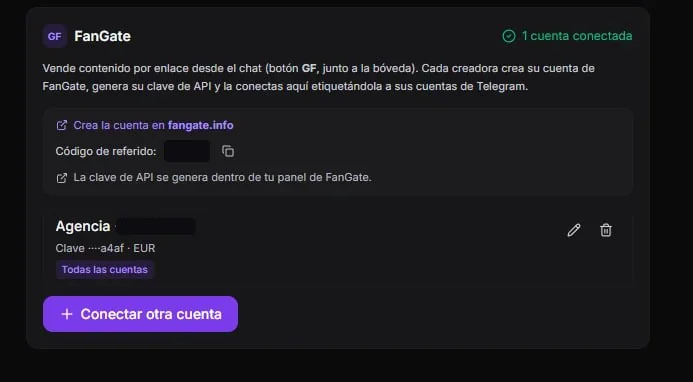
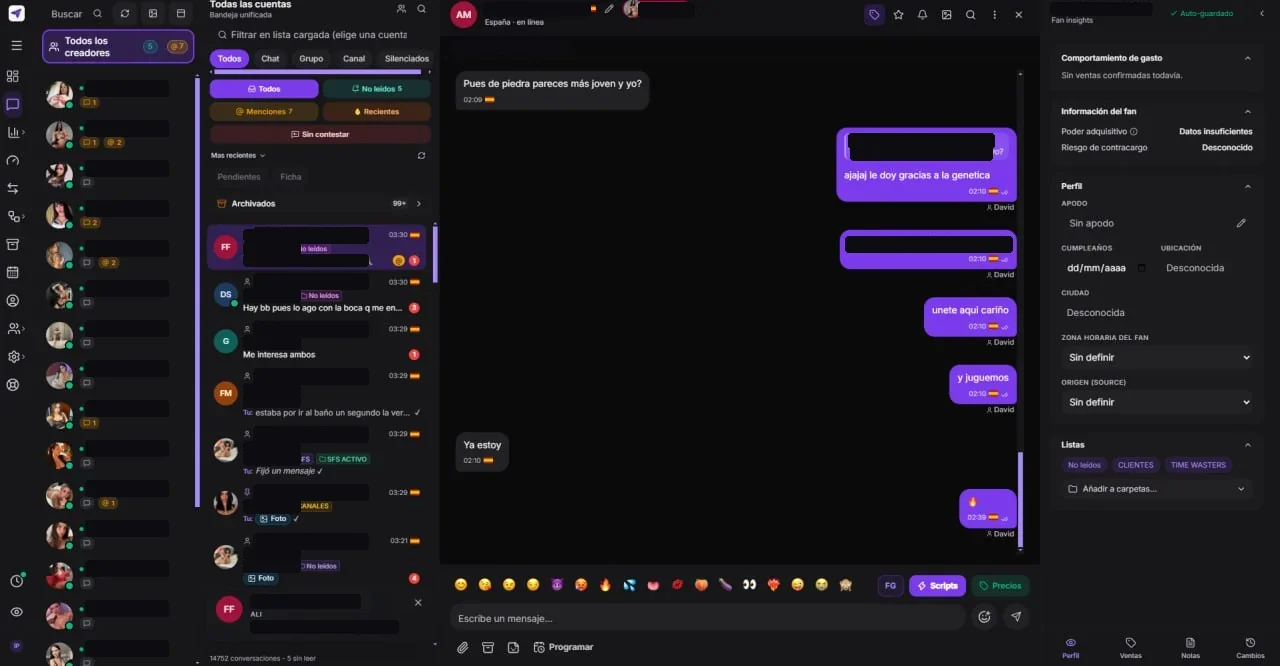
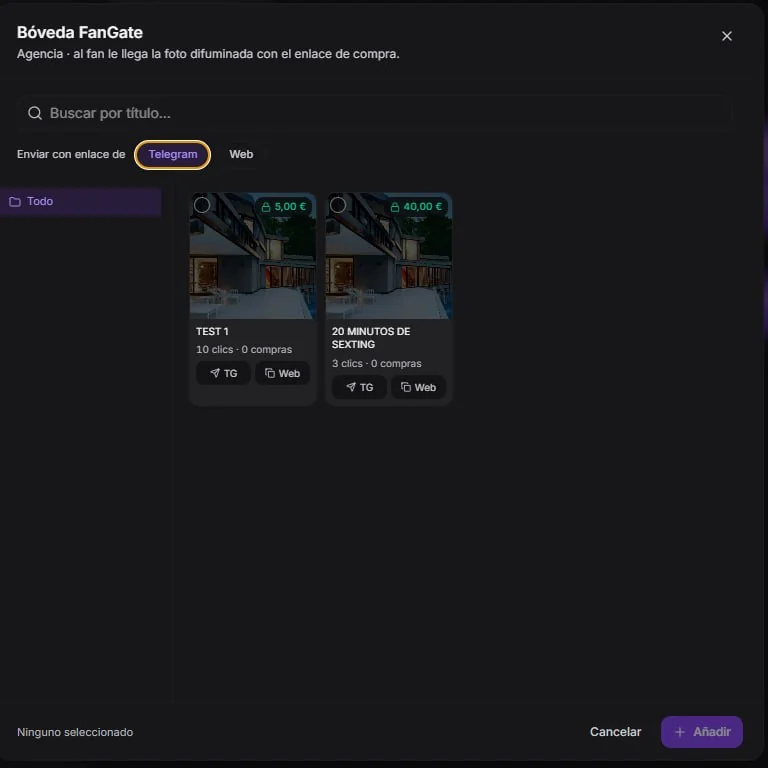
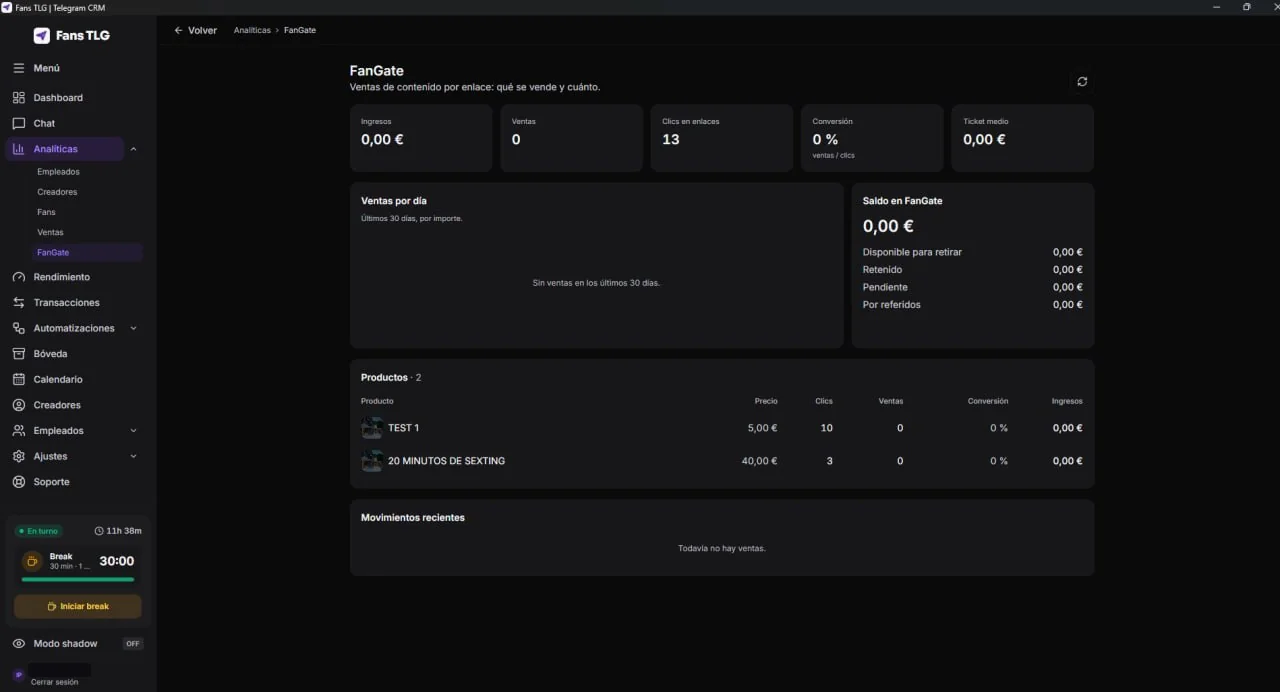
Setup
Done once, by whoever runs the agency:
- No Fangate account yet? Create one. Verification takes a few minutes.
- In Fans TLG, go to Settings › APIs and connect the account.
- Assign the connection to each creator’s Telegram accounts. No assignment means it works for all of them.
- The FG button appears in the connected chats.
Chatters never see the Fangate credentials. They work from their own CRM login, only in the accounts assigned to them. Fans TLG also sets up new accounts for free on request.
Fees
Fangate’s standard fee, 12.5% on the creator side. The creator keeps 87.5%. Fans TLG charges nothing on the sale. Every Fans TLG plan includes the integration, with a 7-day trial.
Running another CRM? Fangate has scoped API keys, an OpenAPI spec, upload sessions and payment webhooks. See the API overview or book a call.
Share this article: