;%20}%20.cls-2,%20.cls-3%20{%20fill:%20%23fff;%20}%20.cls-3%20{%20stroke-width:%200px;%20}%20%3c/style%3e%3cclipPath%20id='clippath'%3e%3cpath%20class='cls-3'%20d='M27.79,132.08H0V1.94h94.23v24.67H27.79v32.25h55.35v24.67H27.79v48.56ZM128.8,132.08h-29.52L148.03,1.94h35.75l48.75,130.15h-30.5l-10.29-28.94h-52.46l-10.48,28.94ZM157.73,51.67l-10.1,27.98h35.56l-9.92-27.98-7.77-27.58-7.77,27.58ZM271.76,132.08h-27.79V1.94h27.02l46.23,67.98,11.83,20.4-1.75-30.69V1.94h27.79v130.15h-26.42l-47.4-68.56-11.67-19.23,2.15,32.23v55.56ZM426.18,133.65c-16.18,0-29.2-5.79-39.04-17.38-9.85-11.59-14.77-28.08-14.77-49.46,0-19.8,5.79-35.89,17.38-48.25,11.59-12.38,27.63-18.56,48.1-18.56,13.72,0,25.59,3.02,35.63,9.04,10.04,6.02,17.32,14.46,21.85,25.33l-23.5,17.88c-1.81-7.64-5.66-13.82-11.56-18.54-5.89-4.73-13.36-7.1-22.42-7.1-11.67,0-20.52,3.6-26.54,10.79-6.02,7.18-9.02,16.99-9.02,29.42s3.04,22.64,9.13,29.83c6.09,7.18,14.65,10.77,25.65,10.77,16.05,0,26.94-7.57,32.65-22.73h-35.75v-22.33h62.35v69.73h-18.46l-6.6-47.4c-.64,15.41-4.89,27.42-12.73,36.04-7.83,8.61-18.61,12.92-32.33,12.92ZM535.93,132.08h-29.52L555.16,1.94h35.75l48.75,130.15h-30.5l-10.29-28.94h-52.46l-10.48,28.94ZM564.87,51.67l-10.1,27.98h35.56l-9.92-27.98-7.77-27.58-7.77,27.58ZM709.98,132.08h-27.79V26.6h-38.83V1.94h105.46v24.67h-38.83v105.48ZM857.6,132.08h-95.58V1.94h95.58v24.67h-67.79v27.4h56.71v24.67h-56.71v28.75h67.79v24.67ZM885.56,132.08h0c-8.15,0-14.76-6.61-14.76-14.76v-.58c0-8.15,6.61-14.76,14.76-14.76h0c8.15,0,14.76,6.61,14.76,14.76v.58c0,8.15-6.61,14.76-14.76,14.76Z'/%3e%3c/clipPath%3e%3c/defs%3e%3cg%20id='Ebene_1-2'%20data-name='Ebene%201'%3e%3cg%3e%3cpath%20class='cls-2'%20d='M27.79,132.08H0V1.94h94.23v24.67H27.79v32.25h55.35v24.67H27.79v48.56ZM128.8,132.08h-29.52L148.03,1.94h35.75l48.75,130.15h-30.5l-10.29-28.94h-52.46l-10.48,28.94ZM157.73,51.67l-10.1,27.98h35.56l-9.92-27.98-7.77-27.58-7.77,27.58ZM271.76,132.08h-27.79V1.94h27.02l46.23,67.98,11.83,20.4-1.75-30.69V1.94h27.79v130.15h-26.42l-47.4-68.56-11.67-19.23,2.15,32.23v55.56ZM426.18,133.65c-16.18,0-29.2-5.79-39.04-17.38-9.85-11.59-14.77-28.08-14.77-49.46,0-19.8,5.79-35.89,17.38-48.25,11.59-12.38,27.63-18.56,48.1-18.56,13.72,0,25.59,3.02,35.63,9.04,10.04,6.02,17.32,14.46,21.85,25.33l-23.5,17.88c-1.81-7.64-5.66-13.82-11.56-18.54-5.89-4.73-13.36-7.1-22.42-7.1-11.67,0-20.52,3.6-26.54,10.79-6.02,7.18-9.02,16.99-9.02,29.42s3.04,22.64,9.13,29.83c6.09,7.18,14.65,10.77,25.65,10.77,16.05,0,26.94-7.57,32.65-22.73h-35.75v-22.33h62.35v69.73h-18.46l-6.6-47.4c-.64,15.41-4.89,27.42-12.73,36.04-7.83,8.61-18.61,12.92-32.33,12.92ZM535.93,132.08h-29.52L555.16,1.94h35.75l48.75,130.15h-30.5l-10.29-28.94h-52.46l-10.48,28.94ZM564.87,51.67l-10.1,27.98h35.56l-9.92-27.98-7.77-27.58-7.77,27.58ZM709.98,132.08h-27.79V26.6h-38.83V1.94h105.46v24.67h-38.83v105.48ZM857.6,132.08h-95.58V1.94h95.58v24.67h-67.79v27.4h56.71v24.67h-56.71v28.75h67.79v24.67ZM885.56,132.08h0c-8.15,0-14.76-6.61-14.76-14.76v-.58c0-8.15,6.61-14.76,14.76-14.76h0c8.15,0,14.76,6.61,14.76,14.76v.58c0,8.15-6.61,14.76-14.76,14.76Z'/%3e%3cg%20class='cls-1'%3e%3crect%20class='cls-3'%20x='-27.9'%20y='-32.28'%20width='934.94'%20height='189.98'/%3e%3c/g%3e%3c/g%3e%3c/g%3e%3c/svg%3e)
Some fans want to give you more than the price of a set. The custom came out better than they asked for, you answered at 2 a.m., or they simply like what you do. Until now the only way to show it was a second purchase. Now there is a better one: fans can send you a tip, right on your Fangate checkout page.
What changed
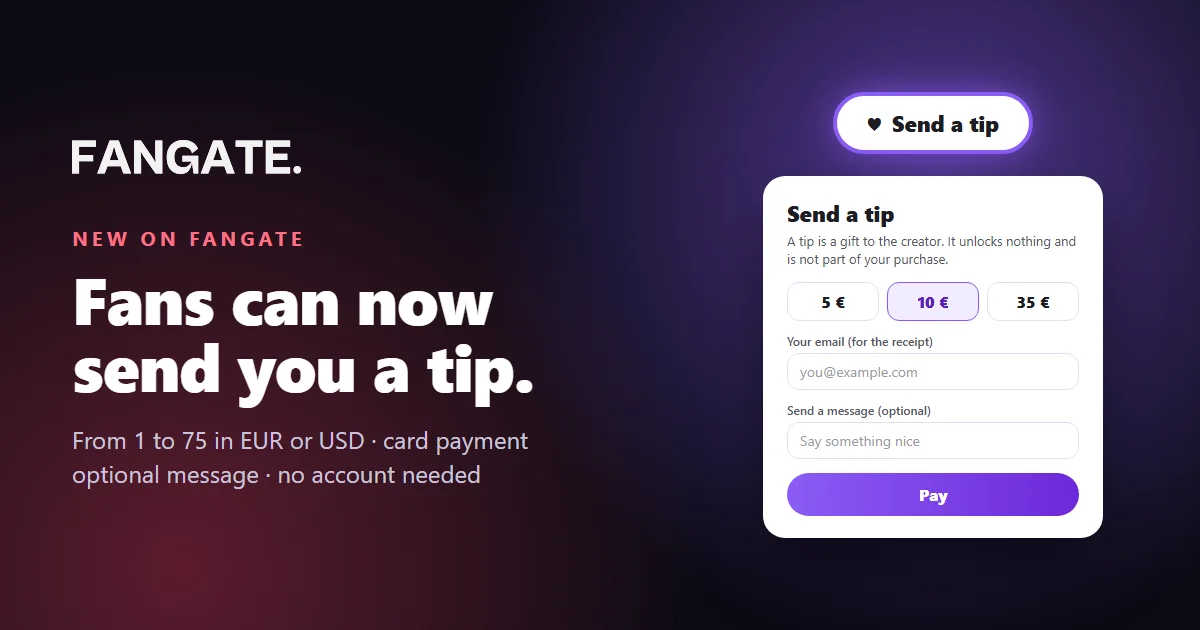
Every product link you share now shows a ♥ Send a tip button, right above the secure checkout box. It appears again after the purchase, when the fan opens what they just bought. There is nothing to switch on: tips are live for every Fangate creator.
Send a tip
A tip is a gift to the creator. It unlocks nothing and is not part of your purchase.
5 €10 €35 €
Your email (for the receipt)
you@example.com
Send a message (optional)
Say something nice
Pay
Card payment. The creator sees your message, never your card details.
The tip window your fans see.
How a fan sends a tip
- Tap “Send a tip”. A small window opens on top of the page. The purchase stays exactly as it was.
- Pick an amount. One tap on 5, 10 or 35, or any whole amount from 1 to 75 in your currency.
- Add an email and, if they like, a message. The email is for the receipt. The message can be up to 500 characters.
- Pay by card. A secure card checkout opens, a green check confirms the tip, and the fan is back on your page.
No Fangate account is needed. And a tip is a gift: it unlocks nothing and is kept separate from the purchase. The fan knows exactly what they are paying for, and so do you.
What you get
- The money in your wallet. Each tip is booked as “Tip from a fan” in your Fangate wallet and paid out with your normal payouts, after the usual hold period.
- The message. If the fan wrote something, it reaches you together with the tip. You see their words, never their card details.
- Your currency. Tips are charged in your account currency, EUR or USD.
- No extra work. No settings page, no separate link to build, no product to create.
Tips in Telegram
If you use the Fangate Telegram Mini App, type @Fngatebot tip in any chat. The bot offers one card: “Send a tip”. Send it, and your fan gets a button that opens your personal tip page, with no product attached. Inside Telegram the card payment opens in the same view, so the fan never leaves the chat.
Five moments that earn tips
- Right after a custom. “Hope you love it. If you want to say thanks, there is a tip button under your content.”
- After a long chat. Close a good conversation in Telegram with the tip card underneath instead of another sales pitch.
- Milestones. Birthdays, channel anniversaries, your first 1,000 subscribers: fans like to be part of them.
- After a free teaser. Some fans would rather say thank you than buy. Give them the option.
- In your thank-you message. After a big purchase, a short personal note gets more tips than any banner.
Quick answers
Do I have to turn tips on?
No. The button is live on every checkout page and on the page after the purchase.
How do fans pay?
By card, in a short checkout of its own. Crypto and the other options of your product checkout stay there for purchases.
Can a fan tip without buying?
Yes. The button works before a purchase, and your Telegram tip card needs no product at all.
Everything in one place is on the new Tips page, and the FAQ has the short version for creators and for fans.