;%20}%20.cls-2,%20.cls-3%20{%20fill:%20%23fff;%20}%20.cls-3%20{%20stroke-width:%200px;%20}%20%3c/style%3e%3cclipPath%20id='clippath'%3e%3cpath%20class='cls-3'%20d='M27.79,132.08H0V1.94h94.23v24.67H27.79v32.25h55.35v24.67H27.79v48.56ZM128.8,132.08h-29.52L148.03,1.94h35.75l48.75,130.15h-30.5l-10.29-28.94h-52.46l-10.48,28.94ZM157.73,51.67l-10.1,27.98h35.56l-9.92-27.98-7.77-27.58-7.77,27.58ZM271.76,132.08h-27.79V1.94h27.02l46.23,67.98,11.83,20.4-1.75-30.69V1.94h27.79v130.15h-26.42l-47.4-68.56-11.67-19.23,2.15,32.23v55.56ZM426.18,133.65c-16.18,0-29.2-5.79-39.04-17.38-9.85-11.59-14.77-28.08-14.77-49.46,0-19.8,5.79-35.89,17.38-48.25,11.59-12.38,27.63-18.56,48.1-18.56,13.72,0,25.59,3.02,35.63,9.04,10.04,6.02,17.32,14.46,21.85,25.33l-23.5,17.88c-1.81-7.64-5.66-13.82-11.56-18.54-5.89-4.73-13.36-7.1-22.42-7.1-11.67,0-20.52,3.6-26.54,10.79-6.02,7.18-9.02,16.99-9.02,29.42s3.04,22.64,9.13,29.83c6.09,7.18,14.65,10.77,25.65,10.77,16.05,0,26.94-7.57,32.65-22.73h-35.75v-22.33h62.35v69.73h-18.46l-6.6-47.4c-.64,15.41-4.89,27.42-12.73,36.04-7.83,8.61-18.61,12.92-32.33,12.92ZM535.93,132.08h-29.52L555.16,1.94h35.75l48.75,130.15h-30.5l-10.29-28.94h-52.46l-10.48,28.94ZM564.87,51.67l-10.1,27.98h35.56l-9.92-27.98-7.77-27.58-7.77,27.58ZM709.98,132.08h-27.79V26.6h-38.83V1.94h105.46v24.67h-38.83v105.48ZM857.6,132.08h-95.58V1.94h95.58v24.67h-67.79v27.4h56.71v24.67h-56.71v28.75h67.79v24.67ZM885.56,132.08h0c-8.15,0-14.76-6.61-14.76-14.76v-.58c0-8.15,6.61-14.76,14.76-14.76h0c8.15,0,14.76,6.61,14.76,14.76v.58c0,8.15-6.61,14.76-14.76,14.76Z'/%3e%3c/clipPath%3e%3c/defs%3e%3cg%20id='Ebene_1-2'%20data-name='Ebene%201'%3e%3cg%3e%3cpath%20class='cls-2'%20d='M27.79,132.08H0V1.94h94.23v24.67H27.79v32.25h55.35v24.67H27.79v48.56ZM128.8,132.08h-29.52L148.03,1.94h35.75l48.75,130.15h-30.5l-10.29-28.94h-52.46l-10.48,28.94ZM157.73,51.67l-10.1,27.98h35.56l-9.92-27.98-7.77-27.58-7.77,27.58ZM271.76,132.08h-27.79V1.94h27.02l46.23,67.98,11.83,20.4-1.75-30.69V1.94h27.79v130.15h-26.42l-47.4-68.56-11.67-19.23,2.15,32.23v55.56ZM426.18,133.65c-16.18,0-29.2-5.79-39.04-17.38-9.85-11.59-14.77-28.08-14.77-49.46,0-19.8,5.79-35.89,17.38-48.25,11.59-12.38,27.63-18.56,48.1-18.56,13.72,0,25.59,3.02,35.63,9.04,10.04,6.02,17.32,14.46,21.85,25.33l-23.5,17.88c-1.81-7.64-5.66-13.82-11.56-18.54-5.89-4.73-13.36-7.1-22.42-7.1-11.67,0-20.52,3.6-26.54,10.79-6.02,7.18-9.02,16.99-9.02,29.42s3.04,22.64,9.13,29.83c6.09,7.18,14.65,10.77,25.65,10.77,16.05,0,26.94-7.57,32.65-22.73h-35.75v-22.33h62.35v69.73h-18.46l-6.6-47.4c-.64,15.41-4.89,27.42-12.73,36.04-7.83,8.61-18.61,12.92-32.33,12.92ZM535.93,132.08h-29.52L555.16,1.94h35.75l48.75,130.15h-30.5l-10.29-28.94h-52.46l-10.48,28.94ZM564.87,51.67l-10.1,27.98h35.56l-9.92-27.98-7.77-27.58-7.77,27.58ZM709.98,132.08h-27.79V26.6h-38.83V1.94h105.46v24.67h-38.83v105.48ZM857.6,132.08h-95.58V1.94h95.58v24.67h-67.79v27.4h56.71v24.67h-56.71v28.75h67.79v24.67ZM885.56,132.08h0c-8.15,0-14.76-6.61-14.76-14.76v-.58c0-8.15,6.61-14.76,14.76-14.76h0c8.15,0,14.76,6.61,14.76,14.76v.58c0,8.15-6.61,14.76-14.76,14.76Z'/%3e%3cg%20class='cls-1'%3e%3crect%20class='cls-3'%20x='-27.9'%20y='-32.28'%20width='934.94'%20height='189.98'/%3e%3c/g%3e%3c/g%3e%3c/g%3e%3c/svg%3e)
Your chatters can now send ready-made messages with a PPV or free media in one click, keep them tidy in folders, and fans who buy on Telegram get their unlocked content right in the chat. Here is how scripts, folders and instant delivery work in Fangate Chats.
- What a script is
- How to create a script
- Folders for many scripts
- Sending scripts from the chat
- Telegram: content lands in the chat after the unlock
- FAQ
Anyone who looks after many fans writes the same messages again and again: the welcome, the evening offer, the teaser with three photos. Until now that meant copying the text, opening the Vault, finding the files and setting a price. With scripts, all of that is one building block.
What a script is
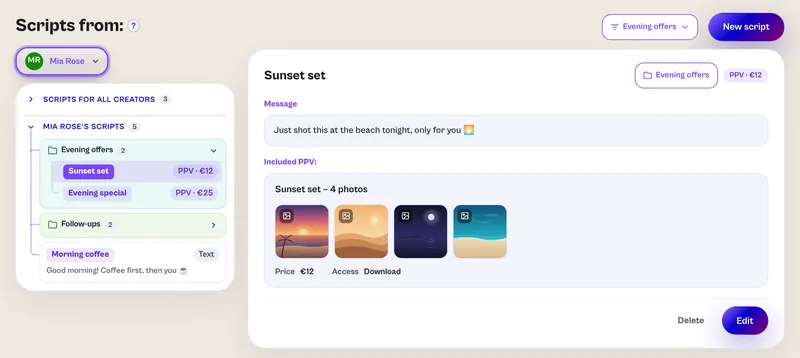
A script is a named, ready-made chat message. It holds a text and, if you like, media from the creator's Vault. Every script shows one of three badges:
| Type | What it holds | Badge |
|---|---|---|
| Text | The message only | Text |
| Free | Text plus 1 to 10 free files from the Vault, sent as one album | Free · number of files |
| PPV | Text plus one paid item (PPV) with its price | PPV · price |
Scripts live in two kinds of lists. The list for all creators appears in every chat and holds text only, because media always belong to exactly one creator. Each creator also has a list of their own: its scripts may carry media and show up only in that creator's chats. A script name is unique within its list.
How to create a script
- Open Scripts in the navigation.
- Click New script and choose who it is for: all creators or one creator.
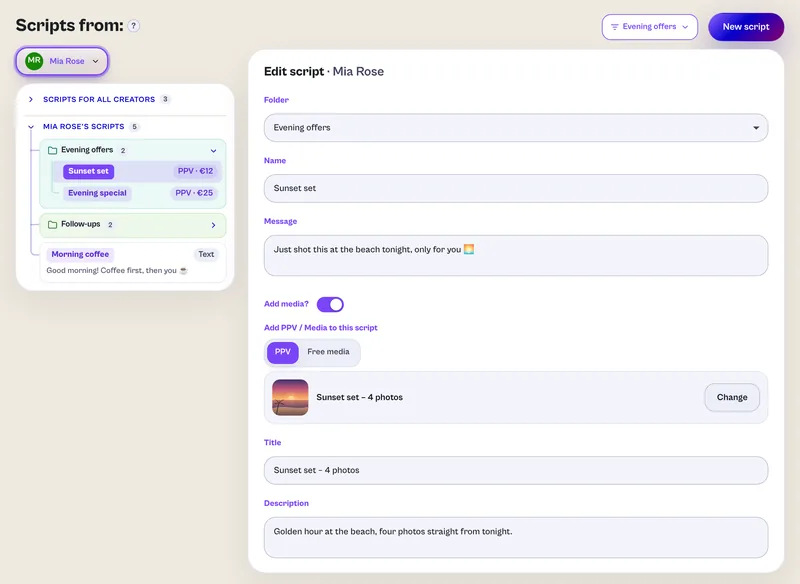
- Enter a name and the message.
- Under Add media? pick PPV or Free media if you want:
- PPV: pick an existing PPV, or pick files from the Vault and a new PPV is created when you save. Set the title and description (at least 15 characters in one of them), the price and the access: Download or View only, and for view only optionally Can be viewed only once.
- Free media: pick up to 10 files from the Vault, optionally as View only once.
- Pick a folder if you like and click Save script.
The price can never go below the minimum price. Fangate Chats also keeps its own copy of each script's thumbnails, because the picture links from the Vault expire after 15 minutes. Your script list stays fully illustrated days later.
Managers and admins write scripts. Chatters use them in the chat.
Folders for many scripts
Folders group scripts by topic, for example Greetings, Evening offers or Follow-ups. Every list has its own folders, the list for all creators as well as each creator's list. There is one folder level, and a script sits in exactly one folder or in none.
- Create: + New folder is the first entry of the folder menu. There you also choose the list the folder belongs to. Folder names are unique per list, up to 60 characters.
- Sort in: Assign to folder at the top right of a script moves it. Add to folder lets you tick several scripts at once. Text-only scripts can also move from the shared list into a creator's folder that way.
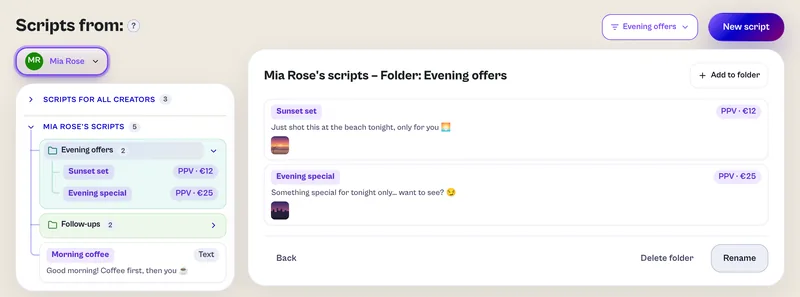
- View: scripts show as a tree. Each folder is a tile that unfolds and has a colour of its own, which it keeps everywhere: on the Scripts page and in the popup in the chat.
- Filter: the folder filter opens a folder next to the list, titled “<list> – Folder: <name>”.
- Rename and delete: deleting a folder keeps its scripts in their list without a folder. They are only deleted too if you tick Also delete the scripts in it.
Sending scripts from the chat
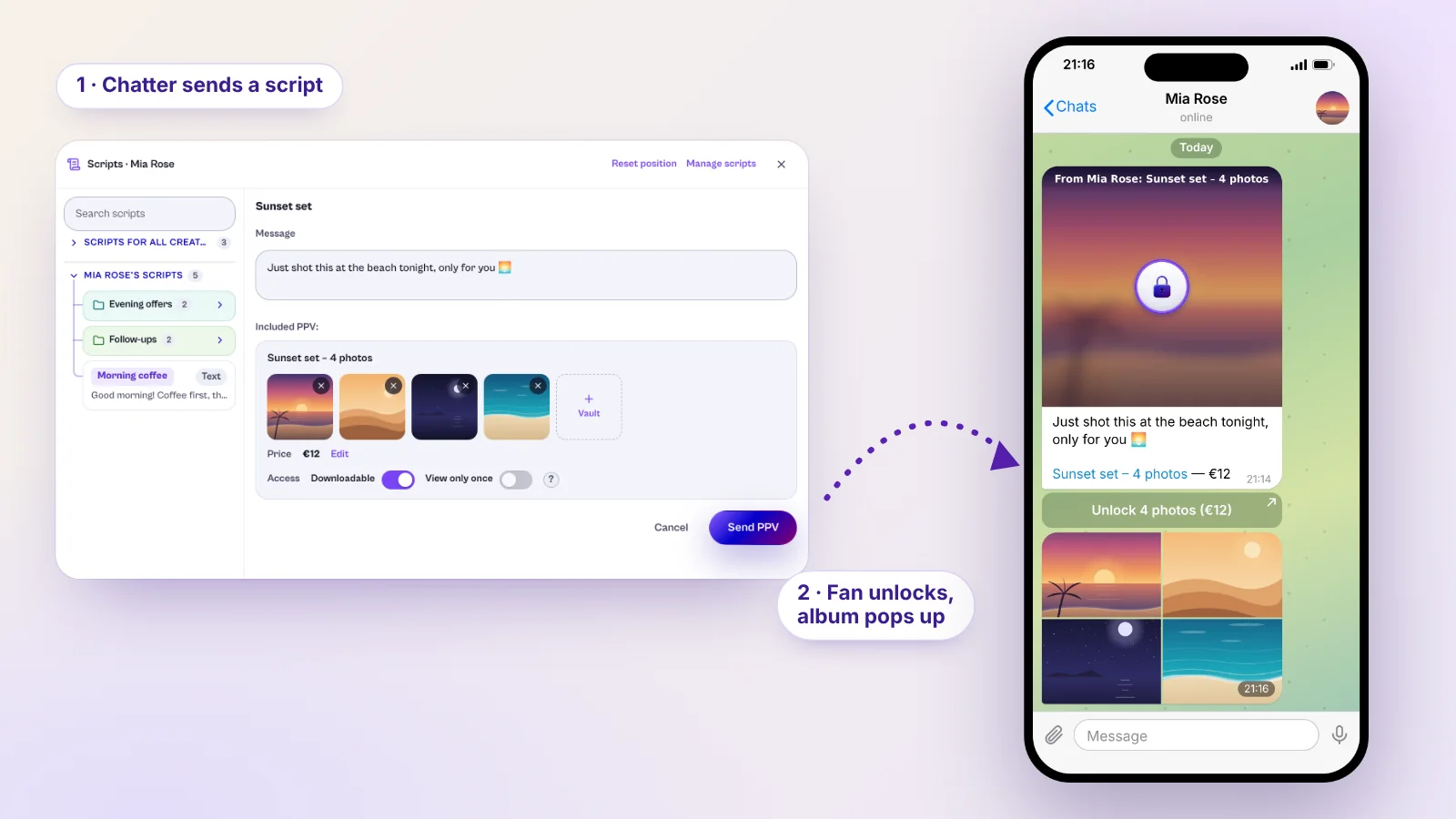
In a chat, the Scripts button or the / key opens the scripts popup. It shows the scripts of the creator the chat belongs to first, then the ones for all creators, each with their folders. On the desktop you can move and resize the popup and drag the divider to make the list wider. The browser remembers both.
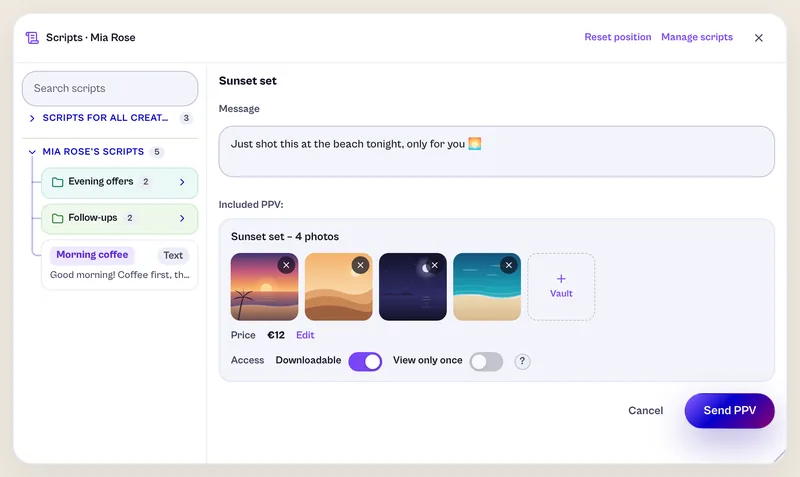
Click a script to see its message, files and price. Whatever the chatter changes here applies to this one send; the saved script stays as it is. Depending on the type it goes out like this:
- Text: the message is sent like any other.
- Free: the files go into the chat as one album together with the text.
- PPV: the fan gets the PPV card with price and button. If the files or the download setting were changed, a new PPV is created for it automatically, with the script's title and description.
Only team members with the right Change scripts can change price and access (Downloadable, View only once). Managers always have it. Chatters who were already on a team received it with the update; new chatters start without it, and you can turn it on under Team. Text and files stay editable for everyone, and the minimum price applies here too.
Telegram: content lands in the chat after the unlock
When a fan buys a PPV card on Telegram, Fangate Chats now sends the content straight into their chat. The files appear as an album right under the card, sent from the creator's connected Telegram account or bot, just as if the creator had sent them by hand. The fan does not need to open a link or look for anything.
How it works
- The chatter sends a PPV card, for example from a script.
- The fan taps the button and pays through Fangate.
- Fangate reports the purchase to the CRM, including the buyer's Telegram account.
- The CRM finds this buyer's chat in which a card of exactly this product was sent.
- The files go into that chat as one album.
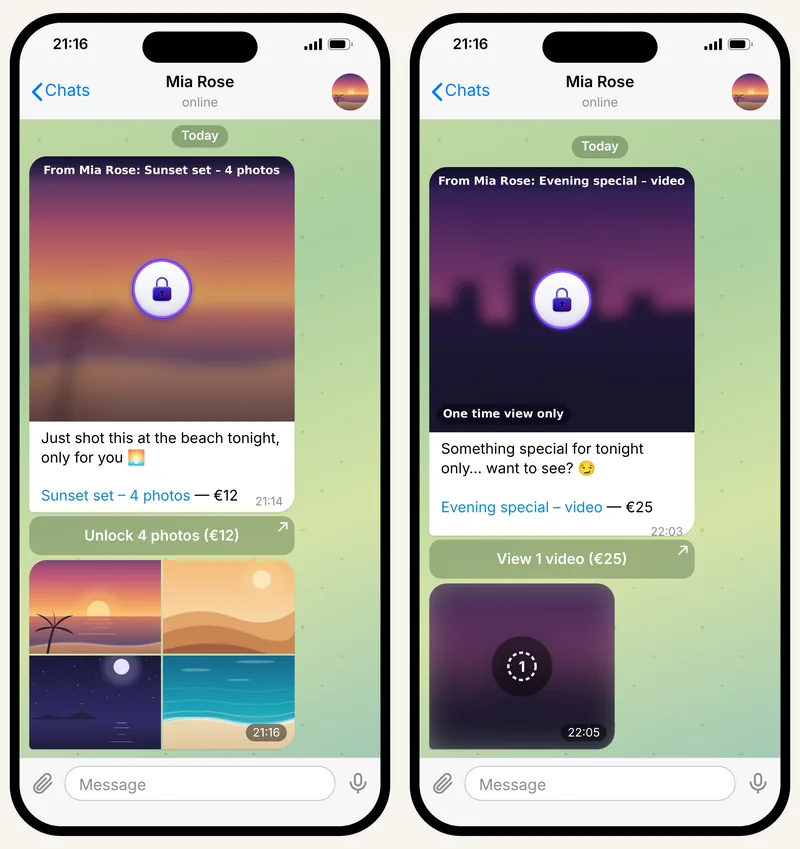
This works in chats of connected accounts, through a bot as well as Telegram Business. The conditions: the content is downloadable, has at most 10 files, and the person who bought it is the fan the card went to. A purchase in the browser, a forwarded link or a view-only product does not trigger a delivery. The fan keeps their normal Fangate access either way, so nothing is lost if a file is too big for Telegram.
Special case: one time view
A card can also go out as a one time view: view once, or 10, 30 or 60 seconds. The button then reads “View 3 photos” instead of “Unlock 3 photos”, and the card's picture carries the note “One time view only”.
After the purchase Fangate holds the content back. The CRM sends it once as a self-destructing message into the fan's Telegram chat, and after that it is gone, with no access on Fangate either. If Telegram cannot deliver it, the content goes back to Fangate, and the fan views it once there, with 4 hours to open it.
One time view works only in private chats of a connected Telegram account and for up to 10 files. It is exclusive to Fangate Chats. Payment, earnings and payouts are not affected.
Tips for getting started
- Put general greetings and phrases into the list for all creators, and offers with media into the creator lists.
- Name folders after the situation (“First contact”, “Weekend”), not after a date.
- Give Change scripts only to chatters who are meant to negotiate prices.
- For instant delivery in Telegram, make PPVs downloadable and keep them at 10 files or fewer.
New to Fangate Chats? The full feature tour for agencies covers the inbox, team, payroll and analytics.
FAQ
Can chatters change the price of a script?
Only with the team right “Change scripts”. Managers always have it, chatters who were already on a team received it with the update, and new chatters start without it. The minimum price always applies.
Can shared scripts contain media?
No. Media always belong to one creator, so the list for all creators holds text only. A creator's own list can hold scripts with a PPV or up to ten free files.
What happens to the scripts when I delete a folder?
They stay in their list without a folder. They are only deleted as well if you tick “Also delete the scripts in it”.
When is bought content delivered straight into the Telegram chat?
When a fan buys a PPV card in a chat of a connected Telegram account or bot, the product is downloadable and has at most ten files. The fan keeps their normal Fangate access in any case.